实验元数据 (Meta Data)

实验编号/标题:例如:LLM-ReAct 搜索 Agent 实验

日期:2026-02-23

所属领域/标签:例如:#LLM #ReAct

🎯 实验前:假设与目标 (Plan)

当前问题 (Problem):理解 Function Calling / Tool Use、ReAct 推理循环、Agent 的核心工作机制

实验目标 (Objective):一个能使用搜索引擎和计算器回答复杂问题的 Agent。比如:“今年诺贝尔物理学奖得主的年龄加起来是多少?

🧪 实验中:执行步骤与变量 (Do)

记录“我到底做了什么”。如果是代码,粘贴关键片段;如果是实物操作,记录参数。

准备工作/工具:

项目结构

 1
 2
 3
 4
 5
 6
 7
 8
 9
10
11
12
13
14
react-agent/
├── .env                     # API 密钥
├── src/
   ├── __init__.py
   ├── tools/               # 工具集合
      ├── __init__.py
      ├── base.py          # 工具基类与注册机制
      ├── search.py        # 搜索工具
      ├── calculator.py    # 计算器工具
      └── weather.py       # 天气工具
   ├── agent.py             # 核心 Agent 循环
   ├── schema.py            # Tool Schema 定义
   └── cli.py               # 命令行入口
├── tests/

控制变量 (Variable):

不变的量:(例:目标网址、抓取频率)

改变的量 (测试点):(例:User-Agent 字符串,IP代理池)

执行步骤 (Log):

工具基类与注册机制

为什么需要工具注册机制? 在真实 Agent 中,工具可能有几十个。手动维护工具列表容易出错。注册机制让"添加新工具"变成"写一个类并注册”。

  1
  2
  3
  4
  5
  6
  7
  8
  9
 10
 11
 12
 13
 14
 15
 16
 17
 18
 19
 20
 21
 22
 23
 24
 25
 26
 27
 28
 29
 30
 31
 32
 33
 34
 35
 36
 37
 38
 39
 40
 41
 42
 43
 44
 45
 46
 47
 48
 49
 50
 51
 52
 53
 54
 55
 56
 57
 58
 59
 60
 61
 62
 63
 64
 65
 66
 67
 68
 69
 70
 71
 72
 73
 74
 75
 76
 77
 78
 79
 80
 81
 82
 83
 84
 85
 86
 87
 88
 89
 90
 91
 92
 93
 94
 95
 96
 97
 98
 99
100
101
102
103
104
105
106
107
108
109
110
111
112
113
114
115
116
117
118
119
# src/tools/base.py

from abc import ABC, abstractmethod

class Tool(ABC):
    """工具基类 - 所有工具必须继承此类
    为什么用抽象类?
    1. 强制每个工具实现 name, description, parameters, execute
    2. 统一接口,Agent 不需要关心工具的具体实现
    3. 便于自动生成 Tool Schema 发送给 LLM
    """

    @property
    @abstractmethod
    def name(self) -> str:
        """工具名称(英文,作为 function name)"""
        ...

    @property
    @abstractmethod
    def description(self) -> str:
        """工具描述 - 这段代码会直接发给 LLM
        描述质量直接影响模型是否能正确选择和使用工具
        好的描述:明确说明工具能做什么,什么时候该用、输入输出是什么
        坏的描述:过于笼统或缺少使用场景说明
        """
        ...

    @property
    @abstractmethod
    def parameters(self) -> dict:
        """参数的 JSON schema - 告诉 LLM 这个工具接受什么参数

        遵循 JSON Schema 规范:
        {
            "type": "object",
            "properties": {
                "param_name": {
                    "type": "string",
                    "description": "参数说明"
                }
            },
            "required": ["param_name"]
        }
        """
        ...

    @abstractmethod
    def execute(self, **kwargs) -> str:
        """执行工具并返回字符串结果

        为什么返回字符串?
        因为结果要作为 tool_result 发回给 LLM,LLM 只理解文本
        即使是结构化数据,也应该序列化为字符串
        """
        ...

    def to_anthropic_schema(self) -> dict:
        """转换为 Anthropic API 要求的 tool schema 格式

        这个方法让每个工具能自动生成自己的 schema,
        不需要手动维护一个大的 tools 列表
        """
        return {
            "name": self.name,
            "description": self.description,
            "input_schema": self.parameters,
        }

class ToolRegistry:
    """工具注册中心

    功能:
    1. 注册/管理所有可用工具
    2. 根据工具名查找并执行工具
    3. 自动生成发给 LLM 的 tools 列表
    """

    def __init__(self):
        self._tools: dict[str, Tool] = {}

    def register(self, tool: Tool) -> None:
        """注册一个工具"""
        if tool.name in self._tools:
            raise ValueError(f"工具 '{tool.name}' 已注册,名称不能重复")
        self._tools[tool.name] = tool
        print(f"已注册工具:{tool.name}")

    def get(self, name: str) -> Tool:
        """根据名称获取工具"""
        if name not in self._tools:
            raise KeyError(
                f"工具 '{name}' 未注册。可用工具: {list(self._tools.keys())}"
            )
        return self._tools[name]

    def execute(self, name: str, **kwargs) -> str:
        """查找并执行工具

        这是 Agent Loop 中调用工具的统一入口。
        Agent 不需要知道具体工具的实现,只需要
        register.execute("search", query="xxx")
        """
        tool = self.get(name)
        try:
            result = tool.execute(**kwargs)
            return result
        except Exception as e:
            # 工具执行失败时,把错误信息返回给 LLM
            # LLM 可能会换一种方式重试
            return f"工具执行出错: {type(e).__name__}: {str(e)}"

    def get_all_schemas(self) -> list[dict]:
        """生成所有工具的 schema 列表 - 直接传给 Anthropic API 的 tools 参数"""
        return [tool.to_anthropic_schema() for tool in self._tools.values()]

    def list_tools(self) -> list[str]:
        """列出所有已注册的工具名"""
        return list(self._tools.keys())

实现具体工具

搜索工具:

  1
  2
  3
  4
  5
  6
  7
  8
  9
 10
 11
 12
 13
 14
 15
 16
 17
 18
 19
 20
 21
 22
 23
 24
 25
 26
 27
 28
 29
 30
 31
 32
 33
 34
 35
 36
 37
 38
 39
 40
 41
 42
 43
 44
 45
 46
 47
 48
 49
 50
 51
 52
 53
 54
 55
 56
 57
 58
 59
 60
 61
 62
 63
 64
 65
 66
 67
 68
 69
 70
 71
 72
 73
 74
 75
 76
 77
 78
 79
 80
 81
 82
 83
 84
 85
 86
 87
 88
 89
 90
 91
 92
 93
 94
 95
 96
 97
 98
 99
100
101
102
103
104
105
106
107
108
109
110
111
112
113
114
115
116
117
118
119
120
121
122
123
124
125
126
127
128
129
130
131
132
133
134
135
136
137
138
139
140
141
142
143
144
145
146
147
148
149
150
151
152
153
154
155
156
157
158
159
160
161
162
163
164
165
166
167
168
169
170
171
172
173
174
175
176
177
178
179
180
181
182
183
184
185
186
187
188
189
190
191
192
193
194
195
196
197
198
199
200
201
202
203
# src/agent.py
from pyexpat.errors import messages

from anthropic import Anthropic

from src.tools.base import ToolRegistry


class ReActAgent:
    """ReAct Agent - 本项目的核心

    这个类实现了 Agent 的核心运行循环
    """

    def __init__(self,
                 tool_registry: ToolRegistry,
                 model: str = "claude-sonnet-4-20250514",
                 max_iterations: int = 100,
                 verbose: bool = True
                 ):
        self.client = Anthropic()
        self.client.base_url= "http://1.95.142.151:3000"
        self.model = model
        self.tools = tool_registry
        print(self.tools.get_all_schemas())
        # 防止无限循环
        self.max_iterations = max_iterations
        self.verbose = verbose

        # ---- System Prompt ----
        # 这个 Prompt 定义了 Agent 的行为模式
        self.system_prompt = """你是一个智能研究助手,能够使用工具来回答用户的问题。

## 工作方式
1. 仔细分析用户的问题,思考需要那些信息
2. 使用可用的工具获取所需的信息
3. 如果一次工具调用不够,继续调用直到获得足够信息
4. 基于收集到的所有信息,给出准确、完整的最终答案

## 重要规则
- 每次思考时,先说明你的推理过程(为什么要调用这个工具)
- 如果搜索结果不够好,尝试更换不同的关键词来重新搜索
- 计算任务务必使用 calculator 工具,不要心算
- 最终回答要引用具体的信息来源
- 如果无法找到所需信息,诚实地告诉用户"""

    # ===============================
    # 核心方法:Agent Loop
    # ===============================
    def run(self, user_query: str) -> str:
        """允许 Agent - 这是整个项目最核心的方法

        流程:
        1. 将用户问题发送给 LLM
        2. LLM 返回内容,检查时候有 tool_use
        3. 如果有 -> 执行工具 -> 把结果发回给 LLM -> 回到第 2 步
        4. 如果没有 -> LLM 已得出最终答案 -> 返回

        Args:
            user_query: 用户的问题

        Returns:
            Agent 的最终答案
        """

        # --- 初始化消息列表 ----
        # message 是 Agent 的工作记忆,记录整个推理过程
        messages = [
            {"role": "user", "content": user_query},
        ]

        if self.verbose:
            print(f"\n{'=' * 60}")
            print(f"🧑 用户: {user_query}")
            print(f"{'=' * 60}")

        # ---- Agent 循环 -----
        for iteration in range(self.max_iterations):
            if self.verbose:
                print(f"\n--- 第 {iteration + 1} 轮推理 ---")

            print(self.tools.get_all_schemas())
            # step 1: 调用 LLM
            response = self.client.messages.create(
                model=self.model,
                max_tokens=4096,
                system=self.system_prompt,
                tools=self.tools.get_all_schemas(),
                messages=messages,
            )

            if self.verbose:
                self._log_response(response)

            # Step 2: 检查停止原因
            #
            # stop_reason 的含义
            # - "end_turn" -> 模型认为可以回答,不需要工具
            # - "tool_use" -> 模型决定调用工具
            # - "max_tokens" -> 输出被截断
            if response.stop_reason == "end_turn":
                # 模型给出了最终回答
                final_answer = self._extract_text(response)
                if self.verbose:
                    print(f"\n{'=' * 60}")
                    print(f"🤖 最终回答: {final_answer}")
                    print(f"{'=' * 60}")
                    print(f"(共 {iteration + 1} 轮推理)")
                return final_answer

            if response.stop_reason == "tool_use":
                # Step 3: 将模型的回复(包含 tool_use 块)加入消息历史
                #
                # 关键:必须把完整的 response.content 加入 messages
                # 它包含模型的思考文本 AND 工具调用请求
                # 如果只加文本不加 tool_use,API 会报错
                #
                messages.append(
                    {
                        "role": "assistant",
                        "content": response.content, # 包含 TextBlock + ToolUseBlock
                    }
                )

                # Step 4: 执行每个工具调用,收集结果
                tool_results = self._execute_tool_calls(response)

                # Step 5: 将工具结果发回给 LLM
                #
                # 关键:tool_result 必须作为 "user" 角色的消息发送
                # 每个 tool_result 必须包含对应的 tool_use_id
                #
                messages.append({
                    "role": "user",
                    "content": tool_results,
                })
                # 回到循环顶部,LLM 将基于工具结果继续推理
                continue

            # 异常情况: max_tokens 截断
            if response.stop_reason == "max_tokens":
                return "回答被截断,请尝试更简短的问题。"

        # 超过最大迭代次数
        return "抱歉,我尝试了多次但无法得出满意的答案。请尝试换一种方式提问。"

    # ===========================================
    # 工具执行
    # ===========================================
    def _execute_tool_calls(self, response) -> list[dict]:
        """执行响应中的所有工具调用

        一个 response 可能包含多个 tool_use 块(并行工具调用)
        例如模型可能同时请求两个不同的关键词
        """
        tool_results = []

        for block in response.content:
            if block.type == "tool_use":
                tool_name = block.name
                tool_input = block.input
                tool_use_id = block.id # 必须用此 ID 关联结果

                if self.verbose:
                    print(f"  🔧 执行: {tool_name}({tool_input})")

                # 通过注册中心执行工具
                result = self.tools.execute(tool_name, **tool_input)

                if self.verbose:
                    # 截断过长的结果以便于阅读日志
                    display_result = result[:300] + "..." if len(result) > 300 else result
                    print(f"  📋 结果: {display_result}")

                # 构造 tool_result 结果
                tool_results.append({
                    "type": "tool_result",
                    "tool_use_id": tool_use_id,  # ⚠ 必须与 tool_use 的 id 匹配
                    "content": result,
                })
        return tool_results

    # ===========================================
    # 辅助方法
    # ===========================================
    def _extract_text(self, response) -> str:
        """从 response 中提取纯文本内容"""
        texts = []
        for block in response.content:
            if hasattr(block, "text"):
                texts.append(block.text)
        return "\n".join(texts)


    def _log_response(self, response) -> None:
        """打印 response 的详细内容(调试用)"""
        for block in response.content:
            if hasattr(block, "text") and block.text:
                print(f"  💭 思考: {block.text[:200]}")
            if block.type == "tool_use":
                print(f"  🎯 决定调用: {block.name}({block.input})")
        print(f"  ⏹️  停止原因: {response.stop_reason}")
        print(f"  📊 Token: {response.usage.input_tokens} in / {response.usage.output_tokens} out")

计算器工具

 1
 2
 3
 4
 5
 6
 7
 8
 9
10
11
12
13
14
15
16
17
18
19
20
21
22
23
24
25
26
27
28
29
30
31
32
33
34
35
36
37
38
39
40
41
42
43
44
45
46
47
48
49
50
51
52
53
54
55
56
57
58
59
60
61
62
63
64
65
66
# src/tools/calculator.py
import ast
import operator

from src.tools.base import Tool


class Calculator(Tool):
    """安全计算器工具
    
    为什么不直接用 eval()?
    eval() 可以执行任意 Python 代码,存在严重安全风险。
    例如:eval("__import__('os').system('rm -rf /')")
    
    使用 ast.parse 只允许数学运算,这是安全实践
    """
    
    # 允许的运算符白名单
    ALLOWED_OPERATORS = {
        ast.Add: operator.add,
        ast.Sub: operator.sub,
        ast.Mult: operator.mul,
        ast.Div: operator.truediv,
        ast.FloorDiv: operator.floordiv,
        ast.Mod: operator.mod,
        ast.Pow: operator.pow,
        ast.USub: operator.neg,
    }
    
    @property
    def name(self) -> str:
        return "calculator"
    
    @property
    def description(self) -> str:
        return (
            "执行数学计算。支持加减乘除、幂运算、取模等基本运算。"
            "输入一个数学表达式字符串"
            "示例:'(91 + 77) * 2'、'3.14 * 5 ** 2'、'1000/12'"
        )
    
    @property
    def parameters(self) -> dict:
        return {
            "type": "object",
            "properties": {
                "expression": {
                    "type": "string",
                    "description": "数学表达式,如 '91 + 77'、'3.14 * 5 ** 2'"
                }
            },
            "required": ["expression"],
        }
    
    def execute(self, expression: str) -> str:
        try:
            # 解析表达式为 AST
            tree = ast.parse(expression, model = "eval")
            result = self._safe_eval(tree.body)
            return f"{expression} = {result}"
        except (SyntaxError, TypeError):
            return f"无法计算表达式:'{expression}'。请使用有效的数学表达式。"
        except ZeroDivisionError:
            return "错误:除数不能为零"
        except Exception as e:
            return f"计算出错:{str(e)}"

天气工具:

 1
 2
 3
 4
 5
 6
 7
 8
 9
10
11
12
13
14
15
16
17
18
19
20
21
22
23
24
25
26
27
28
29
30
31
32
33
34
35
36
37
38
39
40
41
42
43
44
45
46
47
48
49
50
51
52
53
54
55
56
57
58
59
60
61
62
63
64
65
66
67
68
69
70
71
72
73
74
75
76
77
78
79
80
81
# src/tools/weather.py
import requests

from src.tools.base import Tool


class WeatherTool(Tool):
    """天气查询工具 - 使用 Open-Meteo 免费 API"""

    # 常用城市坐标(生产环境应该使用地理编码 API)
    CITY_COORDS = {
        "beijing": (39.9042, 116.4074),
        "北京": (39.9042, 116.4074),
        "shanghai": (31.2304, 121.4737),
        "上海": (31.2304, 121.4737),
        "tokyo": (35.6762, 139.6503),
        "东京": (35.6762, 139.6503),
        "new york": (40.7128, -74.0060),
        "纽约": (40.7128, -74.0060),
        "london": (51.5074, -0.1278),
        "伦敦": (51.5074, -0.1278),
        "san francisco": (37.7749, -122.4194),
        "旧金山": (37.7749, -122.4194),
    }

    @property
    def name(self) -> str:
        return "weather"

    @property
    def description(self) -> str:
        return (
            "查询指定城市的当前天气信息,包括温度、湿度、风速等"
            "支持的城市:北京、上海、东京、纽约、伦敦、旧金山。"
            "输入城市名称(中文或英文均可)"
        )

    @property
    def parameters(self) -> dict:
        return {
            "type": "object",
            "properties": {
                "city": {
                    "type": "string",
                    "description": "城市名称,如 '北京'、'Tokyo'"
                }
            },
            "required": ["city"]
        }

    def execute(self, city: str) -> str:
        city_lower = city.lower().strip()
        coords = self.CITY_COORDS.get(city_lower)

        if not coords:
            available = ", ".join(self.CITY_COORDS.keys())
            return f"不支持查询 '{city}' 的天气。支持的城市: {available}"

        lat, lon = coords
        try:
            url = "https://api.open-meteo.com/v1/forecast"
            params = {
                "latitude": lat,
                "longitude": lon,
                "current_weather": True,
                "timezone": "auto",
            }
            response = requests.get(url, params=params, timeout=10)
            data = response.json()
            weather = data["current_weather"]

            return (
                f"📍 {city} 当前天气:\n"
                f"  🌡️ 温度: {weather['temperature']}°C\n"
                f"  💨 风速: {weather['windspeed']} km/h\n"
                f"  🧭 风向: {weather['winddirection']}°\n"
                f"  ⏰ 更新时间: {weather['time']}"
            )

        except Exception as e:
            return f"获取天气信息失败: {str(e)}"

核心 Agent ReAct 循环

  1
  2
  3
  4
  5
  6
  7
  8
  9
 10
 11
 12
 13
 14
 15
 16
 17
 18
 19
 20
 21
 22
 23
 24
 25
 26
 27
 28
 29
 30
 31
 32
 33
 34
 35
 36
 37
 38
 39
 40
 41
 42
 43
 44
 45
 46
 47
 48
 49
 50
 51
 52
 53
 54
 55
 56
 57
 58
 59
 60
 61
 62
 63
 64
 65
 66
 67
 68
 69
 70
 71
 72
 73
 74
 75
 76
 77
 78
 79
 80
 81
 82
 83
 84
 85
 86
 87
 88
 89
 90
 91
 92
 93
 94
 95
 96
 97
 98
 99
100
101
102
103
104
105
106
107
108
109
110
111
112
113
114
115
116
117
118
119
120
121
122
123
124
125
126
127
128
129
130
131
132
133
134
135
136
137
138
139
140
141
142
143
144
145
146
147
148
149
150
151
152
153
154
155
156
157
158
159
160
161
162
163
164
165
166
167
168
169
170
171
172
173
174
175
176
177
178
179
180
181
182
183
184
185
186
187
188
189
190
191
192
193
194
195
196
197
198
199
200
201
# src/agent.py
from pyexpat.errors import messages

from anthropic import Anthropic

from src.tools.base import ToolRegistry


class ReActAgent:
    """ReAct Agent - 本项目的核心

    这个类实现了 Agent 的核心运行循环
    """

    def __init__(self,
                 tool_registry: ToolRegistry,
                 model: str = "claude-sonnet-4-20250514",
                 max_iterations: int = 100,
                 verbose: bool = True
                 ):
        self.client = Anthropic()
        self.client.base_url= "http://1.95.142.151:3000"
        self.model = model
        self.tools = tool_registry
        # 防止无限循环
        self.max_iterations = max_iterations
        self.verbose = verbose

        # ---- System Prompt ----
        # 这个 Prompt 定义了 Agent 的行为模式
        self.system_prompt = """你是一个智能研究助手,能够使用工具来回答用户的问题。

## 工作方式
1. 仔细分析用户的问题,思考需要那些信息
2. 使用可用的工具获取所需的信息
3. 如果一次工具调用不够,继续调用直到获得足够信息
4. 基于收集到的所有信息,给出准确、完整的最终答案

## 重要规则
- 每次思考时,先说明你的推理过程(为什么要调用这个工具)
- 如果搜索结果不够好,尝试更换不同的关键词来重新搜索
- 计算任务务必使用 calculator 工具,不要心算
- 最终回答要引用具体的信息来源
- 如果无法找到所需信息,诚实地告诉用户"""

    # ===============================
    # 核心方法:Agent Loop
    # ===============================
    def run(self, user_query: str) -> str:
        """允许 Agent - 这是整个项目最核心的方法

        流程:
        1. 将用户问题发送给 LLM
        2. LLM 返回内容,检查时候有 tool_use
        3. 如果有 -> 执行工具 -> 把结果发回给 LLM -> 回到第 2 步
        4. 如果没有 -> LLM 已得出最终答案 -> 返回

        Args:
            user_query: 用户的问题

        Returns:
            Agent 的最终答案
        """

        # --- 初始化消息列表 ----
        # message 是 Agent 的工作记忆,记录整个推理过程
        messages = [
            {"role": "user", "content": user_query},
        ]

        if self.verbose:
            print(f"\n{'=' * 60}")
            print(f"🧑 用户: {user_query}")
            print(f"{'=' * 60}")

        # ---- Agent 循环 -----
        for iteration in range(self.max_iterations):
            if self.verbose:
                print(f"\n--- 第 {iteration + 1} 轮推理 ---")

            # step 1: 调用 LLM
            response = self.client.message.create(
                model=self.model,
                max_tokens=4096,
                system=self.system_prompt,
                tools=self.tools.get_all_schemas(),
                messages=messages,
            )

            if self.verbose:
                self._log_response(response)

            # Step 2: 检查停止原因
            #
            # stop_reason 的含义
            # - "end_turn" -> 模型认为可以回答,不需要工具
            # - "tool_use" -> 模型决定调用工具
            # - "max_tokens" -> 输出被截断
            if response.stop_reason == "end_turn":
                # 模型给出了最终回答
                final_answer = response._extract_text(response)
                if self.verbose:
                    print(f"\n{'=' * 60}")
                    print(f"🤖 最终回答: {final_answer}")
                    print(f"{'=' * 60}")
                    print(f"(共 {iteration + 1} 轮推理)")
                return final_answer

            if response.stop_reason == "tool_use":
                # Step 3: 将模型的回复(包含 tool_use 块)加入消息历史
                #
                # 关键:必须把完整的 response.content 加入 messages
                # 它包含模型的思考文本 AND 工具调用请求
                # 如果只加文本不加 tool_use,API 会报错
                #
                messages.append(
                    {
                        "role": "assistant",
                        "content": response.content, # 包含 TextBlock + ToolUseBlock
                    }
                )

                # Step 4: 执行每个工具调用,收集结果
                tool_results = self._execute_tool_calls(response)

                # Step 5: 将工具结果发回给 LLM
                #
                # 关键:tool_result 必须作为 "user" 角色的消息发送
                # 每个 tool_result 必须包含对应的 tool_use_id
                #
                messages.append({
                    "role": "user",
                    "content": tool_results,
                })
                # 回到循环顶部,LLM 将基于工具结果继续推理
                continue

            # 异常情况: max_tokens 截断
            if response.stop_reason == "max_tokens":
                return "回答被截断,请尝试更简短的问题。"

        # 超过最大迭代次数
        return "抱歉,我尝试了多次但无法得出满意的答案。请尝试换一种方式提问。"

    # ===========================================
    # 工具执行
    # ===========================================
    def _execute_tool_calls(self, response) -> list[dict]:
        """执行响应中的所有工具调用

        一个 response 可能包含多个 tool_use 块(并行工具调用)
        例如模型可能同时请求两个不同的关键词
        """
        tool_results = []

        for block in response.content:
            if block.type == "tool_use":
                tool_name = block.name
                tool_input = block.input
                tool_use_id = block.id # 必须用此 ID 关联结果

                if self.verbose:
                    print(f"  🔧 执行: {tool_name}({tool_input})")

                # 通过注册中心执行工具
                result = self.tools.execute(tool_name, **tool_input)

                if self.verbose:
                    # 截断过长的结果以便于阅读日志
                    display_result = result[:300] + "..." if len(result) > 300 else result
                    print(f"  📋 结果: {display_result}")

                # 构造 tool_result 结果
                tool_results.append({
                    "type": "tool_result",
                    "tool_use_id": tool_use_id,  # ⚠ 必须与 tool_use 的 id 匹配
                    "content": result,
                })
        return tool_results

    # ===========================================
    # 辅助方法
    # ===========================================
    def _extract_text(self, response) -> str:
        """从 response 中提取纯文本内容"""
        texts = []
        for block in response.content:
            if hasattr(block, "text"):
                texts.append(block.text)
        return "\n".join(texts)


    def _log_response(self, response) -> None:
        """打印 response 的详细内容(调试用)"""
        for block in response.content:
            if hasattr(block, "text") and block.text:
                print(f"  💭 思考: {block.text[:200]}")
            if block.type == "tool_use":
                print(f"  🎯 决定调用: {block.name}({block.input})")
        print(f"  ⏹️  停止原因: {response.stop_reason}")
        print(f"  📊 Token: {response.usage.input_tokens} in / {response.usage.output_tokens} out")

组装与命令行入门

 1
 2
 3
 4
 5
 6
 7
 8
 9
10
11
12
13
14
15
16
17
18
19
20
21
22
23
24
25
26
27
28
29
30
31
32
33
34
35
36
37
38
39
40
41
42
43
44
45
46
47
48
49
50
51
52
53
54
55
56
57
58
59
60
61
62
63
64
65
66
import typer
from dotenv import load_dotenv

from src.agent import ReActAgent
from src.tools.base import ToolRegistry
from src.tools.caculator import CalculatorTool
from src.tools.search import WebSearchTool,TavilySearchTool
from src.tools.weather import WeatherTool

load_dotenv()


app = typer.Typer(help="ReAct 搜索 Agent")

def create_agent(model: str="claude-sonnet-4-20250514", verbose: bool=True) -> ReActAgent:
    """创建并配置 Agent"""
    # 注册工具
    registry = ToolRegistry()
    print("正在注册工具...")
    registry.register(CalculatorTool())
    registry.register(WeatherTool())
    registry.register(TavilySearchTool())
    print(f"共注册 {len(registry.list_tools())} 个工具\n")

    # 创建 Agent
    return ReActAgent(
        tool_registry=registry,
        model=model,
        verbose=verbose,
    )

@app.command()
def ask(
        question: str = typer.Argument(help="你的问题"),
        model: str = typer.Option("claude-sonnet-4-20250514", "--model", "-m"),
        quiet: bool = typer.Option(False, "--quiet", "-q", help="只显示最终答案"),
):
    """ 单词提问 """
    agent = create_agent(model=model, verbose=not quiet)
    answer = agent.run(question)
    if quiet:
        print(answer)

@app.command()
def chat(
        model: str = typer.Option("claude-sonnet-4-20250514", "--model", "-m")
):
    """交互式对话模式"""
    agent = create_agent(model=model)
    print("\n💬 进入交互模式(输入 'quit' 退出)\n")

    while True:
        try:
            question = input("🧑 你: ").strip()
            if question.lower() in ("quit", "exit", "q"):
                print("👋 再见!")
                break
            if not question:
                continue
            agent.run(question)
        except KeyboardInterrupt:
            print("\n👋 再见!")
            break

if __name__ == "__main__":
    app()

👁️ 实验后:现象与数据 (Check)

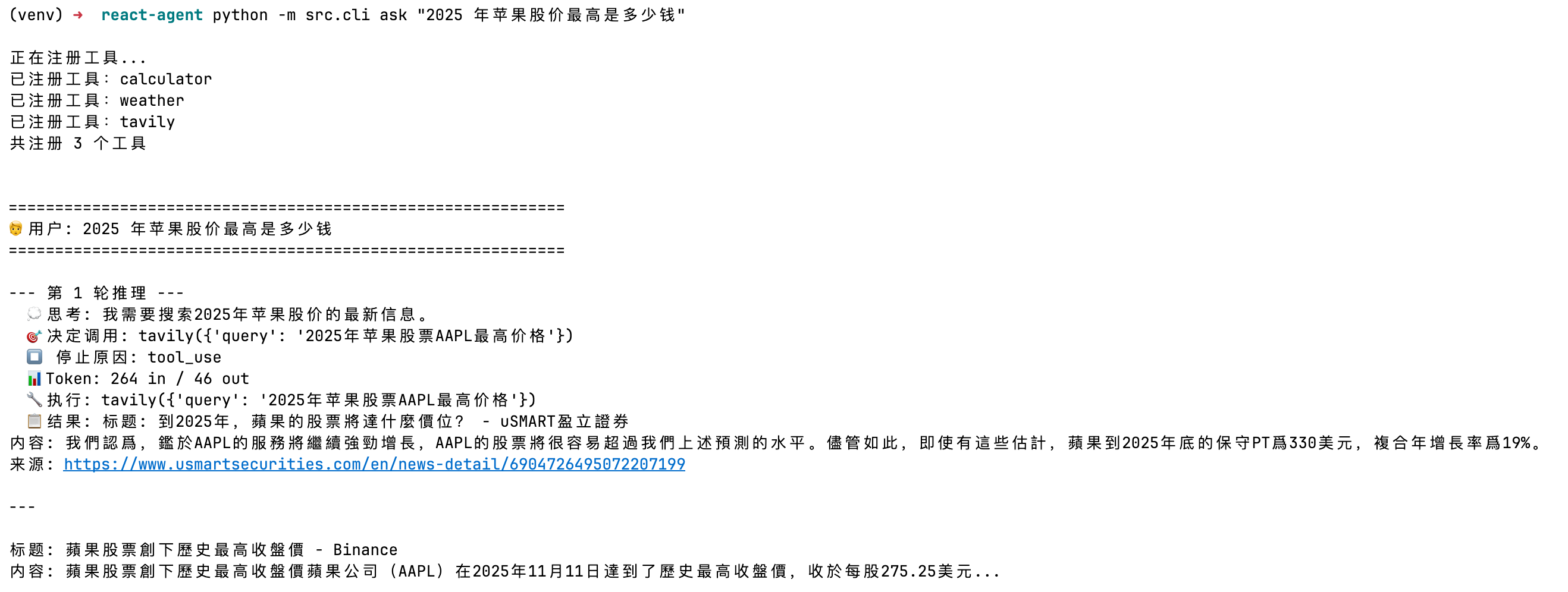
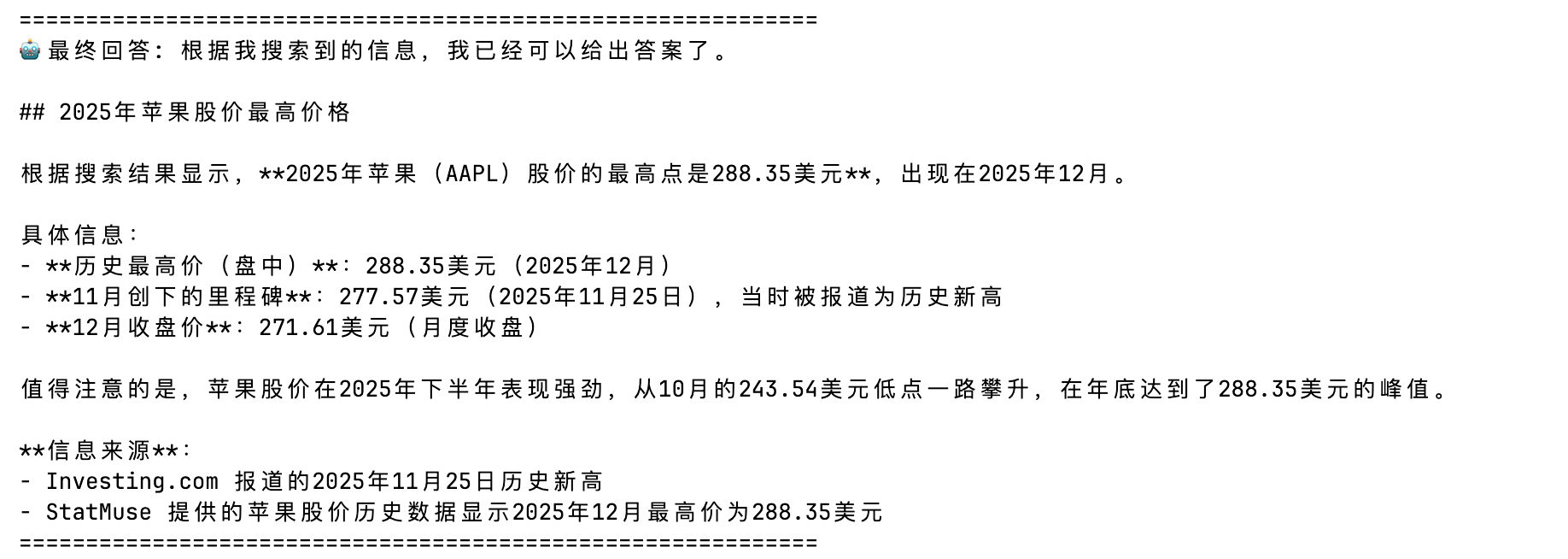
网络搜索工具

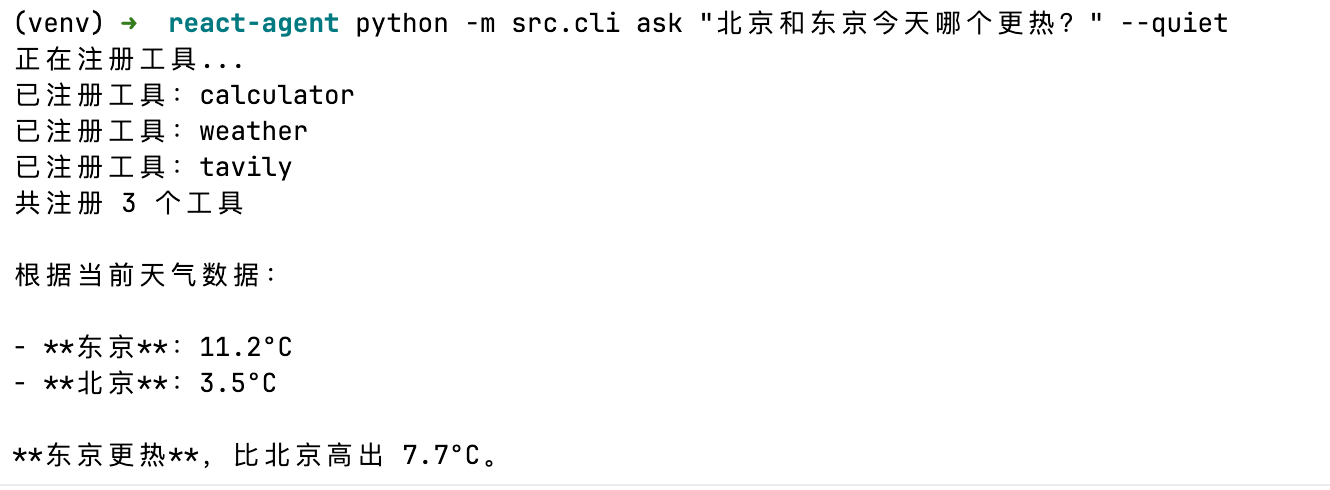
天气查询工具

🧠 深度复盘:分析与结论 (Act)

Q: 解释一下 Tool Use / Function Calling 的工作原理? A: LLM 本身不执行工具。我们在 API 请求中传入工具的 schema(名称、描述、参数定义),模型根据用户问题判断是否需要调用工具。如果需要,模型返回一个包含工具名和参数的 JSON 块(tool_use),我们的代码负责执行对应函数,然后把结果(tool_result)发回给模型。模型看到结果后决定是否需要继续调用工具或给出最终回答。整个过程是一个循环。

Q: ReAct 和 Chain-of-Thought 有什么区别? A: Chain-of-Thought 只让模型"想"(纯推理),ReAct 让模型"边想边做"——在推理过程中穿插工具调用获取真实信息。CoT 适合纯逻辑推理任务,ReAct 适合需要外部信息或执行操作的任务。实际中 Agent 几乎都用 ReAct 模式。

Q: Agent 循环中最容易出问题的地方是什么? A: 四个常见问题:(1) 无限循环——模型反复调用同一工具但得不到满意结果,需要 max_iterations 兜底;(2) 消息格式错误——tool_result 的 tool_use_id 必须与 tool_use 的 id 匹配,否则 API 报错;(3) 上下文膨胀——多轮工具调用后消息过长,超过上下文窗口或成本过高;(4) 工具描述不清——模型选错工具或传错参数。

Q: 如何设计好的 Tool Schema? A: 三个要点:(1) description 要明确说明工具的使用场景和限制,而不是只说功能(“当需要查询实时信息时使用” vs “搜索工具”);(2) 参数描述要包含示例(“搜索关键词,如 ‘2025 Nobel Prize’");(3) 工具数量多时要避免功能重叠,否则模型容易混淆选择。

Q: ReAct 模式有什么局限?适合什么场景? A: 局限:(1) 每一步都是贪心决策,缺乏全局规划能力;(2) 复杂任务可能需要很多轮迭代,成本高且可能迷失方向。适合场景:问题可以分解为"搜索-处理-回答"的信息检索任务、需要实时数据的问答。不适合的场景:需要先制定详细计划再执行的复杂任务(这时用 Plan-and-Execute 模式)。

下一步行动 (Next Actions):

✅ 验证通过,纳入标准流程。

🔄 验证失败,修改假设,开启下一次实验(EXP-002)。

❓ 产生新问题:[记录新问题]