实验元数据 (Meta Data)

实验编号/标题:例如:LLM-智能翻译助手-实验

日期:2026-02-23

所属领域/标签:例如:#LLM

🎯 实验前:假设与目标 (Plan)

当前问题 (Problem):我需要实践下基础的 LLM API 调用

实验目标 (Objective):

构建一个命令行翻译工具,支持:

  1. 自动语言检测 — 不需要用户指定源语言
  2. 高质量翻译 — 带置信度评分和替代翻译方案
  3. 上下文感知 — 可以传入语境提示(如"这是法律文本")
  4. 流式输出 — 翻译结果逐字显示,提升用户体验
  5. 批量翻译 — 支持读取文件批量处理
  6. 多模型切换 — 支持在 Claude / OpenAI 之间切换

核心假设 (Hypothesis):

🧪 实验中:执行步骤与变量 (Do)

准备工作/工具:

项目结构:

 1
 2
 3
 4
 5
 6
 7
 8
 9
10
11
12
13
14
15
16
17
18
translator/
├── pyproject.toml          # 项目配置
├── .env                    # API 密钥(不要提交到 Git)
├── src/
│   ├── __init__.py
│   ├── models.py           # Pydantic 数据模型
│   ├── prompts.py          # Prompt 模板
│   ├── client.py           # LLM 客户端封装
│   ├── translator.py       # 核心翻译逻辑
│   └── cli.py              # 命令行入口
├── tests/
│   ├── test_models.py
│   ├── test_translator.py
│   └── test_prompts.py
└── examples/
    ├── basic_usage.py
    ├── streaming_demo.py
    └── batch_translate.py

安装依赖

 1
 2
 3
 4
 5
 6
 7
 8
 9
10
# 创建项目目录
mkdir translator && cd translator

# 创建虚拟环境
python -m venv venv
source venv/bin/activate  # Linux/Mac
# venv\Scripts\activate   # Windows

# 安装依赖
pip install anthropic openai pydantic python-dotenv rich typer
  • anthropic — Anthropic 官方 SDK,用于调用 Claude API
  • openai — OpenAI SDK,用于对比学习
  • pydantic — 数据校验,Agent 开发的标配
  • python-dotenv — 管理环境变量(API 密钥)
  • rich — 终端美化输出(进度条、彩色文字)
  • typer — 命令行工具框架

配置 API 密钥

1
2
3
# .env 文件
ANTHROPIC_API_KEY=sk-ant-xxxxxxxxxxxxx
OPENAI_API_KEY=sk-xxxxxxxxxxxxx

执行步骤 (Log):

定义数据模型

为什么先写模型? 在 Agent 开发中,定义清晰的数据结构是第一步。它决定了 LLM 需要输出什么、下游系统如何消费数据。这就是 “Structured Output” 的起点。

 1
 2
 3
 4
 5
 6
 7
 8
 9
10
11
12
13
14
15
16
17
18
19
20
21
22
23
24
25
26
27
28
29
30
31
32
33
34
35
36
37
38
39
40
# src/models.py
from pydantic import BaseModel, Field
from enum import Enum

class Confidence(str, Enum):
    """翻译置信等级"""
    HIGH = "high" # 直译即可,含义明确
    MEDIUM = "medium" # 有多重理解模式,已选择最可能的
    LOW = "low"

class TranslationResult(BaseModel):
    """单条翻译结果 - LLM 需要严格按此格式输出"""

    source_language: str = Field(
        description="检测到的源语言,如 'English', '中文', '日本语'"
    )
    target_language: str = Field(
        description="目标语言"
    )
    translation: str = Field(
        description="主翻译结果"
    )
    confidence: Confidence = Field(
        description="翻译置信度"
    )
    alternatives: list[str] = Field(
        default_factory=list,
        description="1-3个替代翻译(不同表达方式或语气)",
        max_length=3
    )
    notes: str = Field(
        default="",
        description="翻译说明:文化差异、语气变化、专业术语解释"
    )

class BatchTranslationResult(BaseModel):
    """批量翻译结果"""
    results: list[TranslationResult]
    total_tokens: int = 0
    model_used: str = ""
  • Field(description=…) — 这些描述最终会成为 prompt 的一部分,帮助 LLM 理解每个字段的含义
  • Enum 约束 — 限制 confidence 只能是 high/medium/low,防止 LLM 输出随意值
  • default_factory=list — 确保 alternatives 字段有默认空列表
  • max_length=3 — 约束替代翻译数量,控制输出长度和成本

Prompt 设计

这是整个项目最重要的部分。 Prompt 设计的质量直接决定了翻译效果。

 1
 2
 3
 4
 5
 6
 7
 8
 9
10
11
12
13
14
15
16
17
18
19
20
21
22
23
24
25
26
27
28
29
30
31
32
33
34
35
36
37
38
39
40
41
42
43
44
45
46
47
48
49
50
51
52
53
54
55
56
57
58
59
60
61
62
63
64
65
66
67
# src/prompts.py
from typing import Optional

SYSTEM_PROMPT = """你是一个专业翻译引擎。你的任务是提供准确、自然的翻译。

## 核心规则
1. 自动检测源语言,翻译为用户指定的目标语言
2. 翻译应自然流畅,符合目标语言的表达习惯,而非逐字直译
3. 保留原文的语气和风格(正式/非正式/幽默等)
4. 对于专业术语,优先使用该领域的标注译法

## 输出格式
你必须严格按照以下 JSON 格式输出,不要包含其他任何内容:
\```json
{
    "source_language":"检测到的源语言名称",
    "target_language":"目标语言名称",
    "translation": "翻译结果",
    "confidence": "high 或 medium 或 low",
    "alternatives": ["替代翻译 1","替代翻译 2"],
    "notes":"翻译注释(比如文化差异说明、术语解释、没有则留空)"
}
\```
## confidence 判定标准
- high: 原文含义明确,翻译准确性高
- medium: 原文有多种理解方式,已选择最可能的翻译
- low: 原文含糊、涉及文化特定表达、或无法准确包含的双关语等
"""

def build_user_prompt(
    text: str,
    target_language: str,
    context: Optional[str] = None,
) -> str:
    """构造用户 prompt

    为什么把构造逻辑单独抽出来?
    1. 便于测试 - 可以单独测试 prompt 生成逻辑
    2. 便于迭代 - prompt 调优时只改这里
    3. 便于追踪 - 生产环境中记录每次的完整 prompt
    """
    prompt = f"请将以下文本翻译为 {target_language}: \n\n{text}"

    if context:
        prompt += f"\n\n背景说明: {context}"

    return prompt

# Few-shot 实例(可选,用于提升输出稳定性)

FEW_SHOT_EXAMPLES = [
    {
        "role": "user",
        "content": '请将以下文本翻译为中文:\n\nIt\'s raining cats and dogs.'
    },
    {
        "role": "assistant",
        "content": """{
    "source_language": "English",
    "target_language": "中文",
    "translation": "外面下着倾盆大雨。",
    "confidence": "high",
    "alternatives": ["雨下得很大。", "大雨倾盆。"],
    "notes": "英文俚语 'raining cats and dogs' 意为下大雨,已意译为中文自然表达,而非直译。"
}"""
    }
]
  1. 角色设定(System Prompt 第一句)— 告诉模型"你是什么",建立行为框架
  2. 明确规则 — 用编号列表给出约束,减少模型的自由发挥空间
  3. 输出格式锁定 — 直接给 JSON 示例,这比"请输出 JSON"有效得多
  4. Few-shot 示例 — 用一个具体例子展示期望的输出格式和风格(特别是如何处理俚语)
  5. Context 注入 — 可选的上下文信息让翻译更准确(如"这是医学文献")

LLM 客户端封装

为什么要封装? 直接散落在代码各处的 API 调用会导致:难以切换模型、无法统一处理错误、无法记录 token 用量。在 Agent 开发中,封装一个 LLM 客户端层是标准做法。

  1
  2
  3
  4
  5
  6
  7
  8
  9
 10
 11
 12
 13
 14
 15
 16
 17
 18
 19
 20
 21
 22
 23
 24
 25
 26
 27
 28
 29
 30
 31
 32
 33
 34
 35
 36
 37
 38
 39
 40
 41
 42
 43
 44
 45
 46
 47
 48
 49
 50
 51
 52
 53
 54
 55
 56
 57
 58
 59
 60
 61
 62
 63
 64
 65
 66
 67
 68
 69
 70
 71
 72
 73
 74
 75
 76
 77
 78
 79
 80
 81
 82
 83
 84
 85
 86
 87
 88
 89
 90
 91
 92
 93
 94
 95
 96
 97
 98
 99
100
101
102
103
104
105
106
107
108
109
110
111
112
113
114
115
116
117
118
119
120
121
122
123
124
125
126
127
128
129
130
131
132
133
134
135
136
137
138
139
140
141
142
143
144
145
146
147
148
149
150
151
152
153
154
155
156
157
158
159
160
161
162
# src/client.py
import json
import time

from anthropic import Anthropic
from anthropic.types import RateLimitError
from openai import max_retries, APIError
from pydantic import ValidationError

from src.models import TranslationResult

class LLMClient:

    def __init__(self, model: str = "claude-sonnet-4-5-20250514"):
        self.client = Anthropic()
        self.model = model
        self.total_input_tokens = 0
        self.total_output_tokens = 0

    #-------------------------------
    # 核心方法 1: 标准调用(返回结构结果)
    #-------------------------------

    def chat(self,
             system: str,
             messages: list[dict],
             max_tokens: int = 1024,
             temperature: float = 0.3, # 翻译任务用较低温度,减少随机性
         ) -> tuple[str, dict]:
        """
        发送请求并返回(文本内容, usage 信息)

        temperature 说明:
        - 0.0 ~ 0.3: 适合翻译、数据提取等确定性任务
        - 0.5 ~ 0.7: 适合一般对话
        - 0.8 ~ 1.0: 适合创意写作
        Agent 开发中,不同节点可能需要不同 temperature
        """
        # 重试逻辑:API 调用可能因限流、网络波动失败
        max_retries = 3
        for attempt in range(max_retries):
            try:
                response = self.client.messages.create(
                    model = self.model,
                    max_tokens = max_tokens,
                    temperature = temperature,
                    system = system,
                    messages = messages,
                )

                # 记录 token 用量
                self.total_input_tokens += response.usage.input_tokens
                self.total_output_tokens += response.usage.output_tokens

                usage = {
                    "input_tokens": response.usage.input_tokens,
                    "output_tokens": response.usage.output_tokens,
                    "model": self.model,
                }

                return response.content[0].text, usage
            except RateLimitError:
                # 限流:指数退避重试
                wait_time = 2 ** attempt
                print(f"限流, {wait_time}秒后重试")
                time.sleep(wait_time)
            except APIError as e:
                if attempt == max_retries - 1:
                    raise
                print(f"API 错误:{e}, 重试中....")
        raise RuntimeError("API 调用失败,已达最大重试次数")

    # ----------------------
    # 核心方法 2: 流式调用
    # ----------------------
    def chat_stream(self,
                    system: str,
                    messages: list[dict],
                    max_tokens: int = 1024,
                    temperature: float = 0.3):
        """
        流式调用 - 逐 token 返回结果

        为什么需要流式?
        1. 用户体验:不用等全部生成完成才能看到结果
        2. 长文本翻译:避免超时
        3. Agent 场景:可以在 Agent 思考过程中实时展示
        """
        with self.client.messages.stream(
            model = self.model,
            max_tokens = max_tokens,
            temperature = temperature,
            system = system,
            messages = messages,
        ) as stream:
            full_text = ""
            for text in stream.text_stream:
                full_text += text
                yield text

            # 流结束后记录 usage
            final_message = stream.get_final_message()
            self.total_input_tokens += final_message.usage.input_tokens
            self.total_output_tokens += final_message.usage.output_tokens

    # -----------------------
    # 核心方法 3: 结构化输出解析
    # -----------------------
    def parse_structured_response(self,
                                  raw_text: str,
                                  model_class: type[TranslationResult] = TranslationResult,
                                  ) -> TranslationResult:
        """
        将 LLM 的文本输出解析为 Pydanic 对象

        这是 Structured Output 的核心
        1. 从原始文本中提取 JSON
        2. 用 Pydantic 校验数据类型和约束
        3. 如果解析失败,清洗后重试
        """
        # 尝试直接解析
        try:
            return model_class.model_validate_json(raw_text)
        except (ValidationError, json.JSONDecodeError):
            pass

        # LLM 有时会在 JSON 前后加 markdown 代码块
        # 清洗:提取 ```json ... ``` 中的内容
        cleaned = raw_text.strip()
        if "```json" in cleaned:
            start = cleaned.index("```json") + 7
            end = cleaned.index("```", start)
            cleaned = cleaned[start:end].strip()
        elif "```" in cleaned:
            start = cleaned.index("```") + 3
            end = cleaned.index("```", start)
            cleaned = cleaned[start:end].strip()

        try:
            return model_class.model_validate_structured(cleaned)
        except (ValidationError, json.JSONDecodeError) as e:
            raise ValueError(
                f"无法解析 LLM 输出为结构化数据。\n"
                f"原始输出:{raw_text[:200]}...\n"
                f"错误: {e}"
            )

    # ---------------------
    # 工具方法:查看累计用量
    # --------------------
    def get_usage_summary(self) -> dict:
        return {
            "total_input_tokens": self.total_input_tokens,
            "total_output_tokens": self.total_output_tokens,
            "estimated_cost_usd": self._estimate_cost(),
        }

    def _estimate_cost(self) -> float:
        """粗略成本估算(以 Claude Sonnet 为例)"""
        input_cost = self.total_input_tokens * 3.0 / 1_000_000
        output_cost = self.total_output_tokens * 15.0 / 1_000_000
        return round(input_cost + output_cost, 4)
  • 重试 + 指数退避 — 所有 API 调用都可能失败,这是生产级代码的基础
  • Token 用量追踪 — Agent 的成本控制从这里开始
  • JSON 清洗 — LLM 经常在 JSON 外面包一层 markdown,必须处理
  • Temperature 策略 — 不同任务需要不同的温度参数

核心翻译器

  1
  2
  3
  4
  5
  6
  7
  8
  9
 10
 11
 12
 13
 14
 15
 16
 17
 18
 19
 20
 21
 22
 23
 24
 25
 26
 27
 28
 29
 30
 31
 32
 33
 34
 35
 36
 37
 38
 39
 40
 41
 42
 43
 44
 45
 46
 47
 48
 49
 50
 51
 52
 53
 54
 55
 56
 57
 58
 59
 60
 61
 62
 63
 64
 65
 66
 67
 68
 69
 70
 71
 72
 73
 74
 75
 76
 77
 78
 79
 80
 81
 82
 83
 84
 85
 86
 87
 88
 89
 90
 91
 92
 93
 94
 95
 96
 97
 98
 99
100
101
102
103
import asyncio
from typing import Optional

from src.client import LLMClient
from src.models import TranslationResult, BatchTranslationResult
from src.prompts import FEW_SHOT_EXAMPLES, build_user_prompt, SYSTEM_PROMPT


class Translator:
    """核心翻译器 - 组合所有组件"""

    def __init__(self, model: str = "claude-sonnet-4-5-20250514", use_few_shot: bool = True):
        self.llm = LLMClient(model = model)
        self.use_few_shot = use_few_shot

    def translate(self, text: str,
                  target_language: str = "中文",
                  context: Optional[str] = None, ) -> TranslationResult:
        """ 标准翻译:发送请求 -> 解析结构化输出 """

        messages = []

        # 可选:加入 few-shot 示例
        if self.use_few_shot:
            messages.extend(FEW_SHOT_EXAMPLES)

        # 构造用户消息
        user_prompt = build_user_prompt(text, target_language, context)
        messages.append({"role": "user", "content": user_prompt})

        # 调用 LLM
        raw_text, usage = self.llm.chat(
            system=SYSTEM_PROMPT,
            messages=messages
        )

        # 解析为结构化结果
        result = self.llm.parse_structured_response(raw_text)
        return result

    def translate_stream(self, text: str,
                         target_language: str="中文",
                         context: Optional[str] = None, ) -> TranslationResult:
        """流式翻译:实时输出 -> 最终解析为结构化结果
        注意:流式模式下,先逐字展示原始输出,
        全部接收完后再做结构化解析。
        这是因为 JSON 必须完整才能解析。
        """
        messages = []
        if self.use_few_shot:
            messages.extend(FEW_SHOT_EXAMPLES)
            
        user_prompt = build_user_prompt(text, target_language, context)
        messages.append({"role": "user", "content": user_prompt})
        
        full_text = ""
        print("翻译中:", end="", flush=True)
        for chunk in self.llm.chat_stream(
            system=SYSTEM_PROMPT,
            messages=messages
        ):
            print(chunk, end="", flush=True)
            full_text += chunk
        print()
        return self.llm.parse_structured_response(full_text)
    
    async def translate_batch(self,
                              texts: list[str],
                              target_language: str = "中文",
                              max_concurrent: int = 3) -> BatchTranslationResult:
        """批量翻译:异步并发处理多条文本
        
        为什么要用 asyncio
        - 10 条文本串行调用可能需要 30s
        - 3 路并发只需要 10 s
        - 但不能无限并发,否则会限流
        - max_concurrent 控制并发数
        """
        semaphore = asyncio.Semaphore(max_concurrent)
        
        async def _translate_one(text: str) -> TranslationResult:
            async with semaphore:
                # 同步调用包装成异步
                loop = asyncio.get_event_loop()
                return await loop.run_in_executor(None, lambda: self.translate(text, target_language))
        
        tasks = [_translate_one(text) for text in texts]
        results = await asyncio.gather(*tasks, return_exceptions=True)
        
        # 过滤掉失败的结果
        successful = []
        for i, result in enumerate(results):
            if isinstance(result, Exception):
                print(f"第 {i+1} 条翻译失败: {result}")
            else:
                successful.append(result)
        
        usage = self.llm.get_usage_summary()
        return BatchTranslationResult(
            results=successful,
            total_tokens=usage["total_input_tokens"] + usage["total_output_tokens"],
            model_used=self.llm.model,
        )

命令行界面

 1
 2
 3
 4
 5
 6
 7
 8
 9
10
11
12
13
14
15
16
17
18
19
20
21
22
23
24
25
26
27
28
29
30
31
32
33
34
35
36
37
38
39
40
41
42
43
44
45
46
47
48
49
50
51
52
53
54
55
56
57
58
59
60
61
62
63
64
65
66
67
68
69
70
71
72
73
74
75
76
77
78
79
80
81
82
83
84
85
86
87
88
89
90
91
92
# src/cli.py
import asyncio
import typer
from rich.console import Console
from rich.table import Table
from rich.panel import Panel
from src.translator import Translator
from dotenv import load_dotenv
# 加载环境变量
load_dotenv()  


app = typer.Typer(help="智能翻译助手 — Agent 开发项目 1")
console = Console()

@app.command()
def translate(
    text: str = typer.Argument(help="要翻译的文本"),
    target: str = typer.Option("中文", "--target", "-t", help="目标语言"),
    context: str = typer.Option(None, "--context", "-c", help="上下文提示"),
    stream: bool = typer.Option(False, "--stream", "-s", help="启用流式输出"),
    model: str = typer.Option("claude-sonnet-4-20250514", "--model", "-m"),
):
    """翻译单条文本"""
    translator = Translator(model=model)

    if stream:
        result = translator.translate_stream(text, target, context)
    else:
        with console.status("翻译中..."):
            result = translator.translate(text, target, context)

    # 格式化输出
    _display_result(result)

    # 显示 token 用量
    usage = translator.llm.get_usage_summary()
    console.print(
        f"\n[dim]Token 用量: {usage['total_input_tokens']} in / "
        f"{usage['total_output_tokens']} out | "
        f"预估费用: ${usage['estimated_cost_usd']}[/dim]"
    )

@app.command()
def batch(
    file: str = typer.Argument(help="包含待翻译文本的文件路径(每行一条)"),
    target: str = typer.Option("中文", "--target", "-t"),
    concurrent: int = typer.Option(3, "--concurrent", "-n", help="并发数"),
):
    """批量翻译文件中的文本"""
    with open(file, "r", encoding="utf-8") as f:
        texts = [line.strip() for line in f if line.strip()]

    console.print(f"读取到 {len(texts)} 条待翻译文本")

    translator = Translator()
    results = asyncio.run(
        translator.translate_batch(texts, target, max_concurrent=concurrent)
    )

    for i, result in enumerate(results.results):
        console.print(f"\n[bold]--- 第 {i+1} 条 ---[/bold]")
        _display_result(result)

    console.print(f"\n[green]完成!共翻译 {len(results.results)} 条[/green]")
    console.print(f"[dim]总 token: {results.total_tokens}[/dim]")


def _display_result(result):
    """格式化展示翻译结果"""
    # 主翻译
    console.print(Panel(
        result.translation,
        title=f"{result.source_language}{result.target_language}",
        subtitle=f"置信度: {result.confidence.value}",
        border_style="green" if result.confidence.value == "high" else "yellow",
    ))

    # 替代翻译
    if result.alternatives:
        table = Table(title="替代翻译", show_header=False)
        for i, alt in enumerate(result.alternatives, 1):
            table.add_row(f"方案 {i}", alt)
        console.print(table)

    # 翻译说明
    if result.notes:
        console.print(f"[italic]📝 {result.notes}[/italic]")


if __name__ == "__main__":
    app()

👁️ 实验后:现象与数据 (Check)

客观记录发生了什么,不要带主观评价。

基本翻译:

带上下文的翻译:

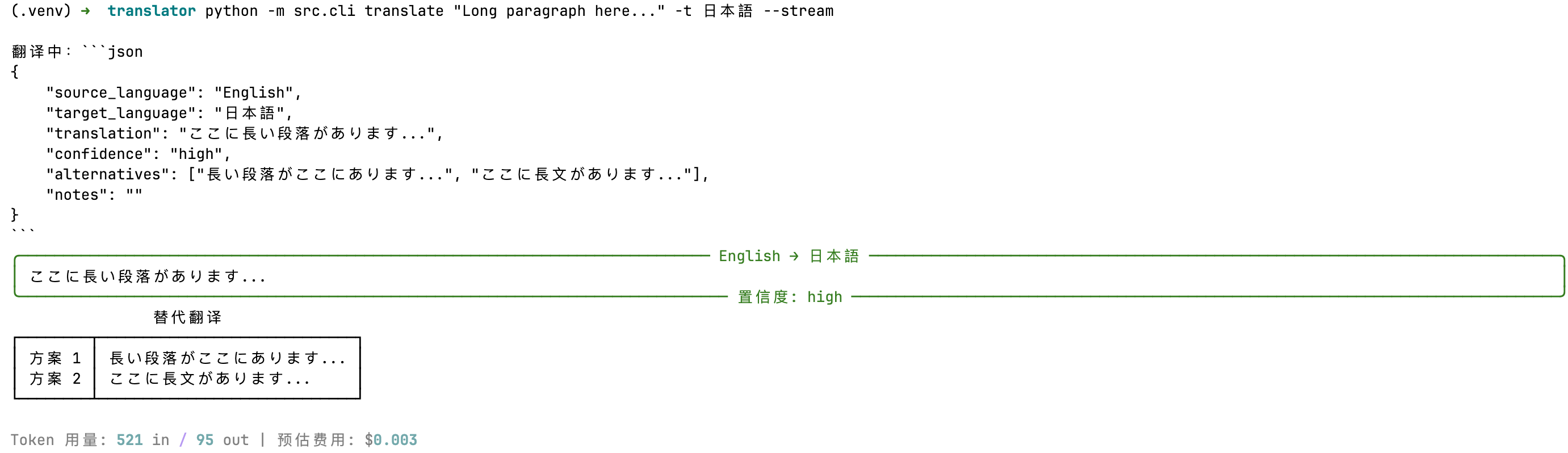
流式输出:
🧠 深度复盘:分析与结论 (Act)

一个基本的 Agent 系统由数据模型、LLM 客户端、Prompt 组成。

同时有一个主类负责串联所有系统从而完成任务。

Q: Structured Output 有哪些实现方式?各有什么优缺点? A: (1) Prompt 约束(本项目方式):灵活但不稳定,需要 JSON 清洗;(2) Function Calling / Tool Use:API 层面保证结构,最可靠;(3) JSON Mode(OpenAI 特有):保证输出是 JSON 但不保证 schema;(4) Constrained Decoding(如 Outlines 库):在采样阶段强制 schema,100% 可靠但只适用于自部署模型。

Q: 流式输出和非流式输出分别适合什么场景? A: 流式适合面向用户的交互场景(聊天、翻译预览)、长文本生成。非流式适合后台任务、需要完整 JSON 解析的场景、批量处理。Agent 的中间步骤通常用非流式(需要完整解析),最终回复用流式(用户体验)。

Q: 如何控制 LLM API 调用的成本? A: (1) Token 用量监控(本项目已实现);(2) 模型路由 — 简单任务用小模型(Haiku),复杂任务用大模型(Opus);(3) 缓存 — 相同输入直接返回缓存结果;(4) Prompt 精简 — 减少不必要的上下文;(5) 批量 API(Anthropic Message Batches)— 异步批处理享受折扣价。

Q: temperature 参数如何选择? A: 取决于任务的确定性需求。翻译、数据提取、分类 → 00.3;一般对话、总结 → 0.50.7;创意写作、头脑风暴 → 0.8~1.0。Agent 中不同节点的 temperature 应该不同:规划节点可以高一些(探索更多方案),执行节点应该低(减少随机性)。

下一步行动 (Next Actions):

✅ 验证通过,纳入标准流程。

🔄 验证失败,修改假设,开启下一次实验(EXP-002)。

❓ 产生新问题:[记录新问题]