用于日后检索和归档,建立知识索引。
实验编号/标题:OpenSpec 实验
日期:Mar 31, 2026
所属领域/标签:例如:#Vibe Coding #OpenSpec
🎯 实验前:假设与目标 (Plan)#
不要在此处长篇大论,用一两句话厘清“为什么做这个”。
当前问题 (Problem):我现在遇到了什么阻碍?或者我想解决什么问题?#
使用 OpenSpec 给用户列表页新增搜索框
前端页面:
- 页面名:UserListPage
- 当前能力:展示用户列表
- 现在要加的功能:
- 页面顶部增加搜索输入框
- 用户输入关键字后,按 name 过滤列表
- 不改后端接口,先做本地过滤
实验目标 (Objective):做完这件事,我想达到什么具体效果?#
例:成功抓取20页数据而不报错。
核心假设 (Hypothesis):(最关键的一步) 我认为怎么做能成功?#
- OpenSpec = 给 AI 编码加一层可落地、可追踪的规格说明书
- 解决的问题
- 纯 AI 聊天,能力很强,但是结果容易不稳定,不可预测
- OpenSpec 通过加一层轻量规格,让人和 AI 在写代码前对齐要做什么
- OpenSpec 工作流
- /opsx:propose -> /opsx:opply -> /opsx:archive
- /opsx:propose:先创建这次变更,并生成规划文档
- /opsx:apply:按前面生成的规格和任务去实现代码
- /opsx:archive:功能做完后归档这次变更,把变更后的规格合并回主规格
- 生成的制品
- proposal.md:为什么做、做什么
- specs/:需求变化,哪些新增/修改/删除
- design.md:技术设计
- tasks.md:实现任务清单
- proposal -> specs -> design -> tasks -> implement
🧪 实验中:执行步骤与变量 (Do)#
记录“我到底做了什么”。如果是代码,粘贴关键片段;如果是实物操作,记录参数。
准备工作/工具:#
- 创建项目
1
| npm create vite@latest user-list-page -- --template react-ts
|
- 填充初始代码
App.tsx:
 1
 2
 3
 4
 5
 6
 7
 8
 9
10
11
12
13
14
15
16
17
18
19
20
21
22
23
24
| import { useEffect, useState } from "react";
export default function UserListPage() {
const [users, setUsers] = useState([]);
useEffect(() => {
setUsers([
{ id: 1, name: "Alice" },
{ id: 2, name: "Bob" },
{ id: 3, name: "Charlie" },
]);
}, []);
return (
<div>
<h1>User List</h1>
<ul>
{users.map((u) => (
<li key={u.id}>{u.name}</li>
))}
</ul>
</div>
);
}
|
- 初始效果
控制变量 (Variable):#
不变的量:(例:目标网址、抓取频率)
改变的量 (测试点):(例:User-Agent 字符串,IP代理池)
执行步骤 (Log):#
- 初始化 OpenSpec
1
2
3
| npm install -g @fission-ai/openspec@latest
cd user-list-page
openspec init
|
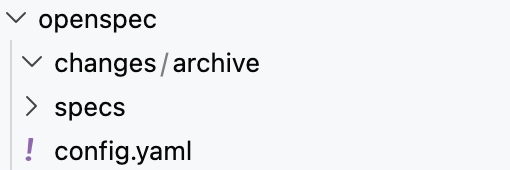
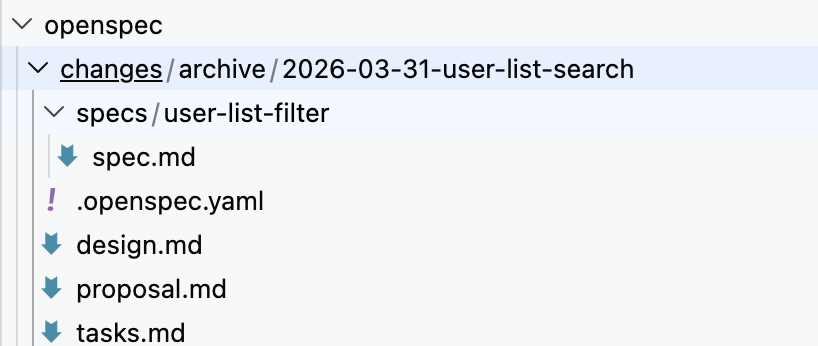
- 查看生成目录
- changes/ 用来存放单次变更
- specs/ 用来存放长期有效的规格
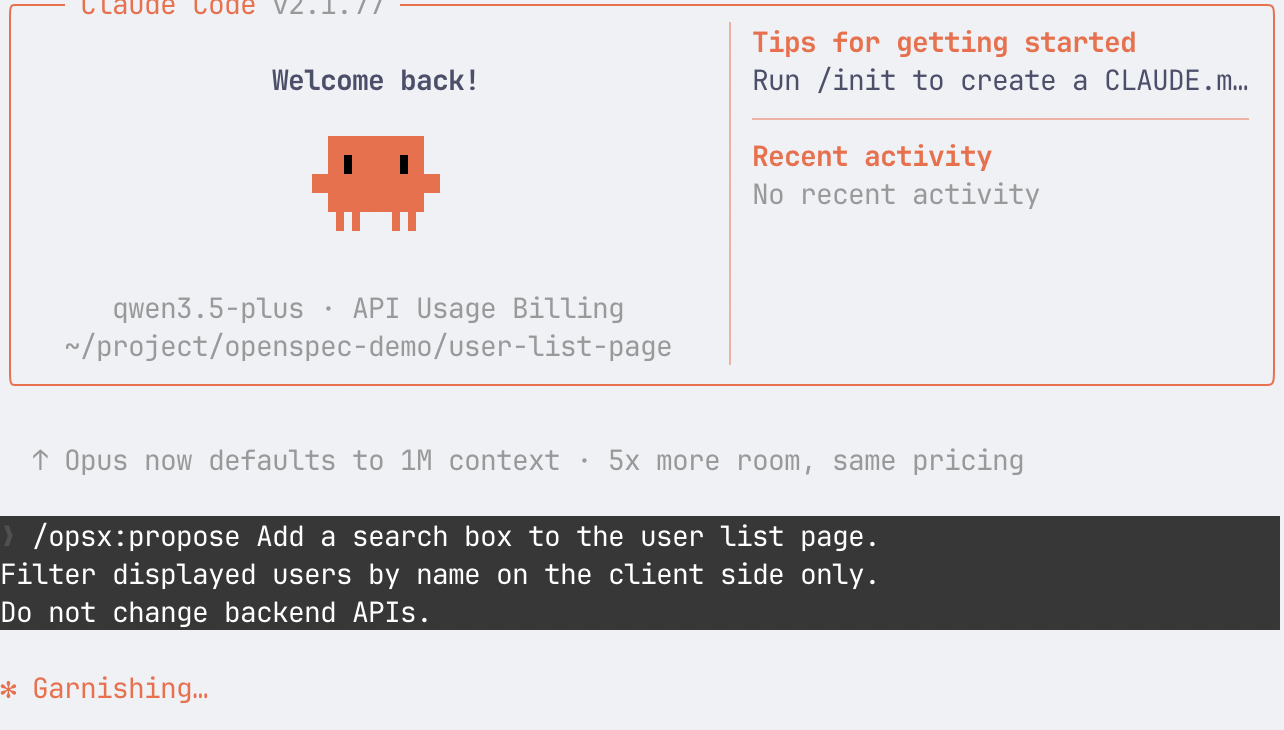
- 在 AI 助手里发起 propose (Claude Code)
- 代码
1
2
3
| /opsx:propose Add a search box to the user list page.
Filter displayed users by name on the client side only.
Do not change backend APIs.
|
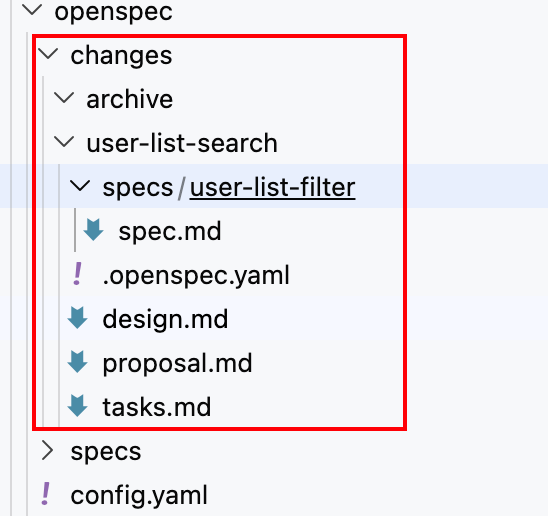
- 生成的文件
- 查看生成文件内容
- proposal.md
- specs/user-list-filter/spec.md
- design.md
- task.md
- 人工审阅 propose 结果
- 有没有超出范围
- 行为定义是否清楚
- 设计是否落到具体文件
- 任务是否可执行
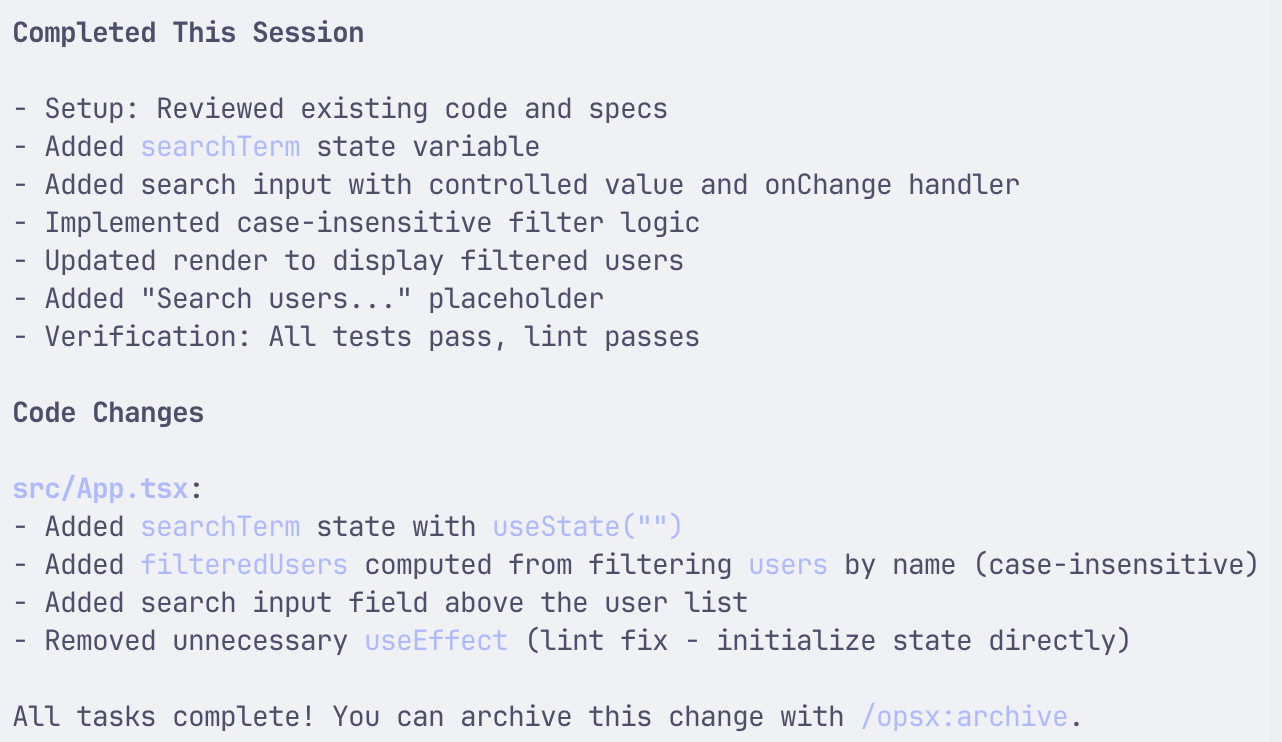
- 执行 apply
- 最终的产物
 1
 2
 3
 4
 5
 6
 7
 8
 9
10
11
12
13
14
15
16
17
18
19
20
21
22
23
24
25
26
27
28
29
30
31
| import { useState } from "react";
export default function UserListPage() {
const [users] = useState<{ id: number; name: string }[]>([
{ id: 1, name: "Alice" },
{ id: 2, name: "Bob" },
{ id: 3, name: "Charlie" },
]);
const [searchTerm, setSearchTerm] = useState("");
const filteredUsers = users.filter((user) =>
user.name.toLowerCase().includes(searchTerm.toLowerCase())
);
return (
<div>
<h1>User List</h1>
<input
type="text"
placeholder="Search users..."
value={searchTerm}
onChange={(e) => setSearchTerm(e.target.value)}
/>
<ul>
{filteredUsers.map((u) => (
<li key={u.id}>{u.name}</li>
))}
</ul>
</div>
);
}
|
- 收尾 archive
👁️ 实验后:现象与数据 (Check)#
proposal.md
 1
 2
 3
 4
 5
 6
 7
 8
 9
10
11
12
13
14
15
16
17
18
19
20
21
22
23
24
25
| ## Why
Users need to quickly find specific users in the list without scrolling through all entries. Adding client-side search improves usability for lists with many users.
## What Changes
- A search input box will be added above the user list
- User list will filter in real-time as the user types
- Filtering is case-insensitive and matches against user names
- No backend changes required - all filtering happens on the client
## Capabilities
### New Capabilities
- `user-list-filter`: Client-side filtering capability for the user list component
### Modified Capabilities
- None
## Impact
- Modified: `src/App.tsx` - Add search state and filtering logic
- New component or inline search UI in the existing page
- No backend API changes
- No breaking changes
|
specs/user-list-filter/spec.md
 1
 2
 3
 4
 5
 6
 7
 8
 9
10
11
12
13
14
15
16
17
18
19
20
21
22
23
24
25
26
27
28
29
30
31
| ## ADDED Requirements
### Requirement: User can filter the user list by name
The system SHALL allow users to filter the displayed user list by entering a search term. The filtering SHALL be case-insensitive and match against user names only.
#### Scenario: User enters a search term
- **WHEN** user types "ali" into the search box
- **THEN** only users whose names contain "ali" (case-insensitive) are displayed
#### Scenario: User clears the search term
- **WHEN** user deletes all text from the search box
- **THEN** all users are displayed again
#### Scenario: Search matches partial names
- **WHEN** user types "bob" and a user named "Bobby" exists
- **THEN** "Bobby" is included in the filtered results
#### Scenario: Case-insensitive matching
- **WHEN** user types "ALICE" or "alice" or "Alice"
- **THEN** the user "Alice" is displayed in both cases
### Requirement: Search box is visible above user list
The system SHALL display a search input field above the user list with a placeholder indicating its purpose.
#### Scenario: Search box initial state
- **WHEN** the user list page loads
- **THEN** an empty search input is displayed above the user list with placeholder text "Search users..."
#### Scenario: Search box reflects current filter
- **WHEN** user has entered a search term
- **THEN** the search box displays the current search term (controlled input)
|
design.md
 1
 2
 3
 4
 5
 6
 7
 8
 9
10
11
12
13
14
15
16
17
18
19
20
21
22
23
24
25
26
27
28
29
30
31
32
33
34
35
36
37
38
39
40
41
42
43
44
45
46
47
48
49
50
51
52
53
54
55
56
57
58
59
60
61
62
63
64
65
66
67
68
69
| ## Context
The user list page currently displays all users without any filtering capability. As the user list grows, finding specific users becomes cumbersome.
**Current state:**
- React component with static user list (3 users hardcoded)
- No search or filter functionality
- All users displayed at all times
**Constraints:**
- Client-side filtering only - no backend API changes
- Minimal code changes to existing component
- Maintain existing user data structure
## Goals / Non-Goals
**Goals:**
- Add a search input field above the user list
- Filter displayed users by name as the user types
- Case-insensitive matching
- Real-time filtering without explicit submit action
**Non-Goals:**
- Server-side search or API modifications
- Filtering by fields other than name (e.g., email, ID)
- Debouncing or performance optimizations (not needed for small lists)
- Search highlighting or match indicators
## Decisions
### 1. Inline search vs. separate component
**Decision:** Add search input inline within the existing `UserListPage` component.
**Rationale:**
- Keeps changes minimal and localized
- No need for component extraction for a single input field
- Easier to maintain state in the same component
**Alternatives considered:**
- Create separate `SearchBox` component - adds unnecessary abstraction for a single input
### 2. Controlled vs. uncontrolled input
**Decision:** Use controlled input with React state.
**Rationale:**
- Enables real-time filtering as user types
- State drives both input value and filtered list
- Follows React best practices
### 3. Filter trigger: onChange vs. explicit submit
**Decision:** Filter on every keystroke (onChange).
**Rationale:**
- Immediate feedback for users
- No extra button needed
- Performance impact negligible for client-side filtering of small lists
## Risks / Trade-offs
- **Performance on large lists** → If list grows significantly, consider adding debouncing. Not a concern for current data size.
- **Case sensitivity confusion** → Use toLowerCase() for both search term and user names to ensure case-insensitive matching.
## Migration Plan
N/A - This is a new feature with no migration required.
## Open Questions
None - implementation approach is clear.
|
task.md
 1
 2
 3
 4
 5
 6
 7
 8
 9
10
11
12
13
14
15
16
17
18
19
| ## 1. Setup
- [ ] 1.1 Read existing App.tsx to understand current component structure
- [ ] 1.2 Review specs and design for implementation requirements
## 2. Core Implementation
- [ ] 2.1 Add search state variable using useState hook
- [ ] 2.2 Add search input element with controlled value and onChange handler
- [ ] 2.3 Implement filter logic to filter users array by search term (case-insensitive)
- [ ] 2.4 Update render to display filtered users instead of full list
- [ ] 2.5 Add placeholder text "Search users..." to search input
## 3. Verification
- [ ] 3.1 Verify search filters users correctly as user types
- [ ] 3.2 Verify case-insensitive matching works
- [ ] 3.3 Verify clearing search shows all users
- [ ] 3.4 Run lint to ensure code quality
|
🧠 深度复盘:分析与结论 (Act)#
这是学习发生的地方。将“经历”转化为“经验”。
结果对比:实际结果 vs. 预期假设。
符合预期 / 部分符合 / 完全相反
原因分析 (Why?):
为什么成功了?是运气还是方法对路?
为什么失败了?是假设错了,还是执行出问题了?
(可以使用“5个为什么”法进行深挖)
获得的知识点 (Key Learnings):#
- OpenSpec 最小开发流程
- 初始化 -> propose -> 检查规格 -> apply -> archive
- /openspec-proposal 发起 propose
- /opsx:apply 执行 apply
- /opsx:archive 收尾 archive
我学到了什么新概念?
纠正了什么旧认知?
下一步行动 (Next Actions):#
✅ 验证通过,纳入标准流程。
🔄 验证失败,修改假设,开启下一次实验(EXP-002)。
❓ 产生新问题:[记录新问题]