🎯 实验前:假设与目标 (Plan)
开发一个 Plugin 给 Claude Code 使用。
当前问题 (Problem):我现在遇到了什么阻碍?或者我想解决什么问题?
开发一个 Claude Code 可以直接读取的 Plugin。
实验目标 (Objective):做完这件事,我想达到什么具体效果?
Claude Code 可以识别并正确运行 Plugin。
核心假设 (Hypothesis):(最关键的一步) 我认为怎么做能成功?
Claude Code Plugin 的最小骨架:
| |
- plugin.json 是插件清单,定义 name/description/version 等元数据
- skills/ 里面的每个目录都是一个 skill,目录里面放 SKILL.md,skill 会变为类似 /my-plugin:hello 这样的命令
- hooks/hooks.json 定义自动触发逻辑
- .mcp.json 定义要启动的 mcp server,插件启用后,里面的 mcp server 会自动作为 claude 的工具出现
🧪 实验中:执行步骤与变量 (Do)
记录“我到底做了什么”。如果是代码,粘贴关键片段;如果是实物操作,记录参数。
准备工作/工具:
List tools or resources used.
控制变量 (Variable):
不变的量:(例:目标网址、抓取频率)
改变的量 (测试点):(例:User-Agent 字符串,IP代理池)
执行步骤 (Log):
先做一个 Skill 插件
创建目录
1 2 3mkdir claude-dev-helper mkdir -p claude-dev-helper/.claude-plugin mkdir -p claude-dev-helper/skills/review写 manifest
claude-dev-helper/.claude-plugin/plugin.json
1 2 3 4 5 6 7 8{ "name": "claude-dev-helper", "description": "A plugin for code review workflows", "version": "1.0.0", "author": { "name": "Your Name" } }插件目录里面放 .claude-plugin/plugin.json,name 会成为 skill 的命名空间
编写一个 SKILL
1 2 3 4 5 6 7 8 9 10 11 12 13 14 15 16--- description: Review the current changes and produce a concise code review report disable-model-invocation: false --- Please review the current project changes. Requirements: 1. Summarize what changed 2. Identify possible bugs 3. Identify style or maintainability issues 4. Give a final risk level: low / medium / high 5. Keep the output concise If the user passed extra arguments, treat them as review focus: $ARGUMENTSSKILL 本质上就是一个带 frontmatter 的 Markdown 指令文件,ClaudeCode 会自动发现它,并把它暴露为 /claude-dev-helper:review
本地运行
1claude --plugin-dir ./claude-dev-helper执行
1/claude-dev-helper:review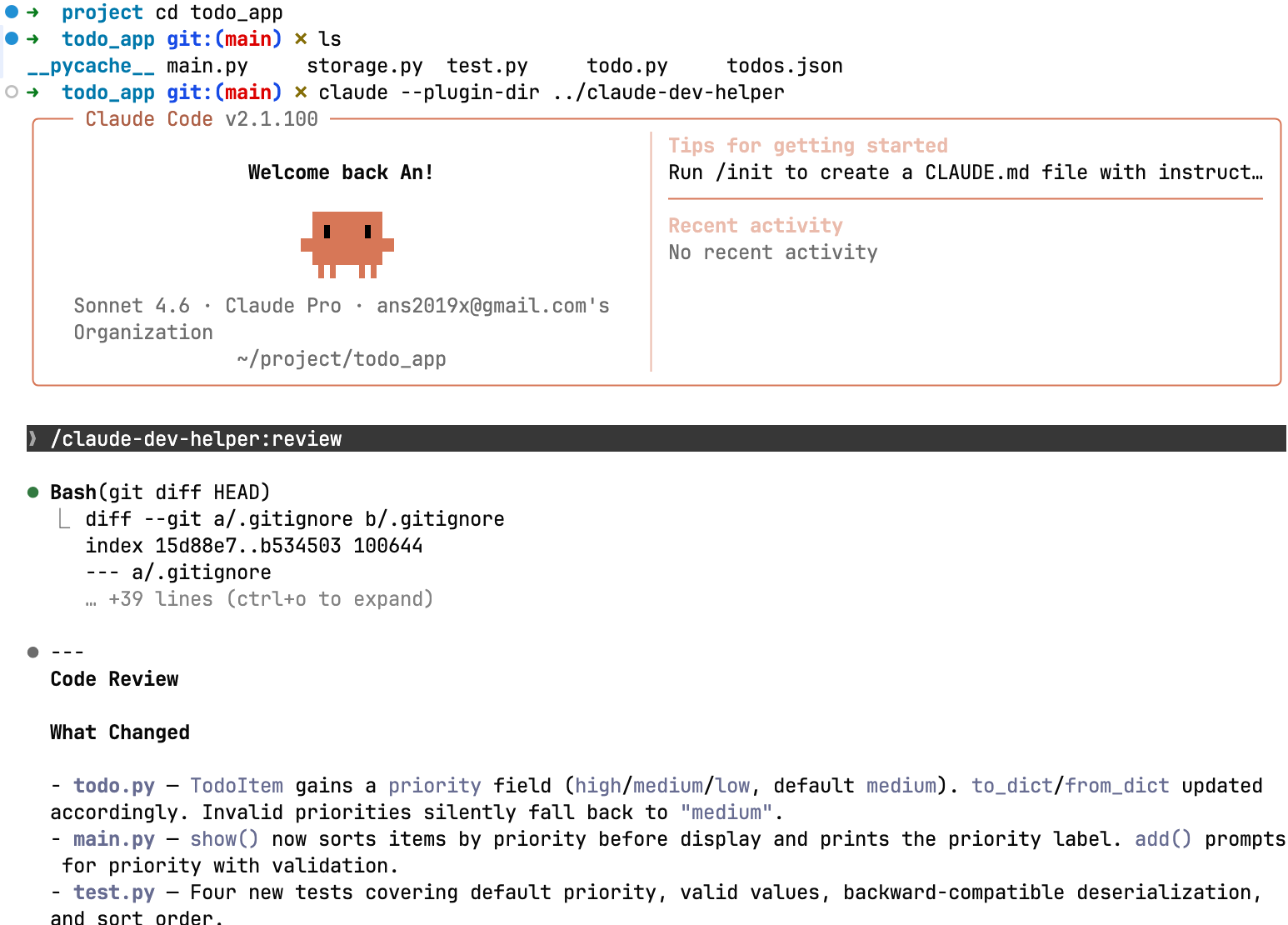
给插件加 hook
SKILL 是主动调用,Hook 是 Claude Code 在某些生命周期自动触发。
Claude Code 的 Hook 可以挂在 SessionStart、UserPromptSubmit、PreToolUse、PostToolUse 等事件上,支持 command、http、prompt、agent 这几类 hook。
新增 hooks 文件
1 2mkdir -p claude-dev-helper/hooks mkdir -p claude-dev-helper/scriptsclaude-dev-helper/hooks/hooks.json
1 2 3 4 5 6 7 8 9 10 11 12 13 14 15{ "hooks": { "PostToolUse": [ { "matcher": "Write|Edit", "hooks": [ { "type": "command", "command": "${CLAUDE_PLUGIN_ROOT}/scripts/after-edit.sh" } ] } ] } }插件里面的 hooks 默认位置是 hooks/hooks.json,Claude Code 支持在插件根目录放这个文件,或者在 plugin.json 里内联配置。
写脚本
claude-dev-helper/scripts/after-edit.sh
1 2 3 4 5#!/usr/bin/env bash set -euo pipefail cat > /tmp/claude-hook-input.json echo "fired at $(date)" >> /tmp/claude-hook.log1chmod +x claude-dev-helper/scripts/after-edit.shhook 脚本必须可执行,否则不会触发;推荐用 ${CLAUDE_PLUGIN_ROOT} 指向插件根目录
重载插件测试
在 Claude Code 会话执行
1/reload-plugins1 2➜ /tmp cat claude-hook.log fired at 2026年 4月10日 星期五 15时18分29秒 CST
把插件升级成 MCP 插件
编写 .mcp.json (claude-dev-helper/.mcp.json)
1 2 3 4 5 6 7 8 9{ "mcpServers": { "ticket-server": { "command": "node", "args": ["${CLAUDE_PLUGIN_ROOT}/server.js"], "cwd": "${CLAUDE_PLUGIN_ROOT}" } } }插件里面 MCP server 的默认位置就是 .mcp.json;启动后会自动作为标准 mcp 工具出现在 claude 的工具箱里
写一个最小 node server (server.js)
1 2 3 4 5 6 7 8 9 10 11 12 13 14 15 16 17 18 19 20 21 22 23 24 25 26 27 28 29 30 31 32 33 34 35 36 37 38 39 40 41 42 43 44 45 46 47 48 49 50 51 52 53 54 55#!/usr/bin/env node import { Server } from "@modelcontextprotocol/sdk/server/index.js"; import { StdioServerTransport } from "@modelcontextprotocol/sdk/server/stdio.js"; import { CallToolRequestSchema, ListToolsRequestSchema } from "@modelcontextprotocol/sdk/types.js"; const server = new Server( { name: "ticket-server", version: "1.0.0" }, { capabilities: { tools: {} } } ); server.setRequestHandler(ListToolsRequestSchema, async () => { return { tools: [ { name: "get_ticket", description: "Get ticket details by ticket id", inputSchema: { type: "object", properties: { id: { type: "string", description: "Ticket id like TICKET-123" } }, required: ["id"] } } ] }; }); server.setRequestHandler(CallToolRequestSchema, async (request) => { if (request.params.name === "get_ticket") { const { id } = request.params.arguments; return { content: [ { type: "text", text: JSON.stringify({ id, title: "Demo ticket from plugin MCP server", status: "OPEN", assignee: "judy", priority: "P1" }, null, 2) } ] }; } throw new Error(`Unknown tool: ${request.params.name}`); }); const transport = new StdioServerTransport(); await server.connect(transport);增加依赖 package.json
1 2 3 4 5 6 7 8{ "name": "claude-dev-helper", "version": "1.0.0", "type": "module", "dependencies": { "@modelcontextprotocol/sdk": "^1.0.0" } }安装
1npm install启动调试
1/reloade-plugin
1Use the ticket-server MCP tool to get details for TICKET-123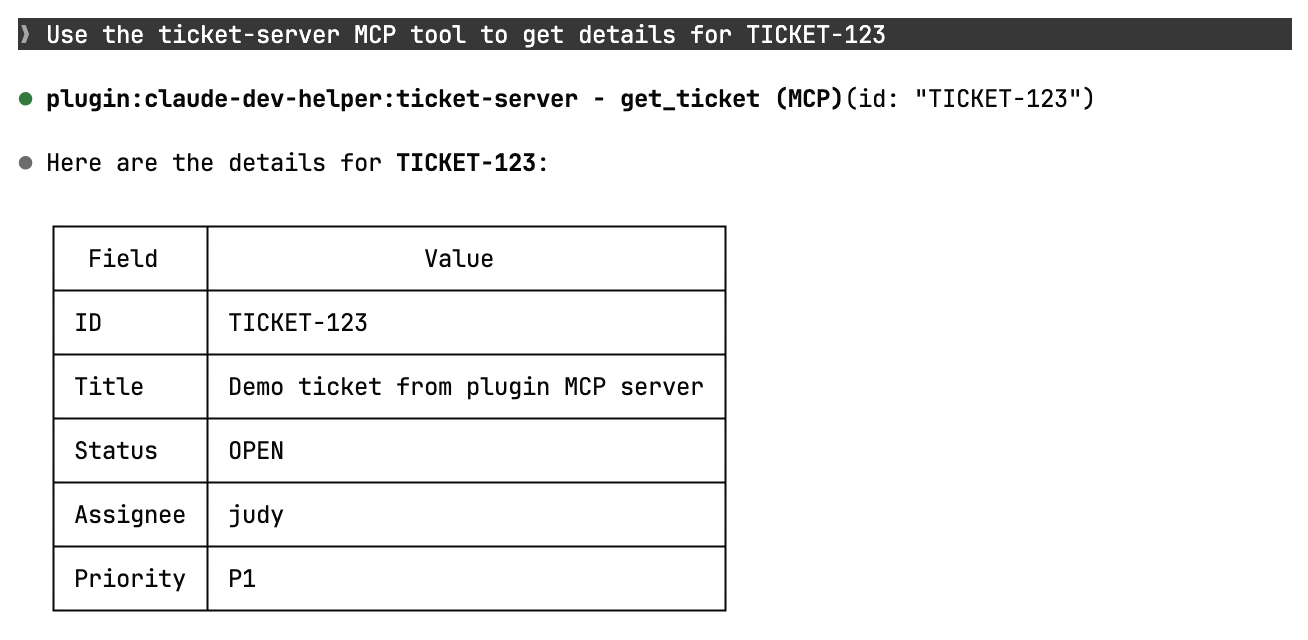
👁️ 实验后:现象与数据 (Check)
客观记录发生了什么,不要带主观评价。
观察到的现象:
成功了吗?报错了吗?报错信息是什么?
产出物的样子(附截图/照片)。
关键数据:
耗时、准确率、转化率、温度、分数等。
例:前5页成功,第6页开始报错 403 Forbidden。
🧠 深度复盘:分析与结论 (Act)
这是学习发生的地方。将“经历”转化为“经验”。
结果对比:实际结果 vs. 预期假设。
符合预期 / 部分符合 / 完全相反
原因分析 (Why?):
为什么成功了?是运气还是方法对路?
为什么失败了?是假设错了,还是执行出问题了?
(可以使用“5个为什么”法进行深挖)
获得的知识点 (Key Learnings):
我学到了什么新概念?
纠正了什么旧认知?
下一步行动 (Next Actions):
✅ 验证通过,纳入标准流程。
🔄 验证失败,修改假设,开启下一次实验(EXP-002)。
❓ 产生新问题:[记录新问题]